
Workday Orchestrate Is Revolutionizing Integrations and Driving Efficiency
Arguably one of the best aspects of Workday is its support for customization.
Workday Extend was introduced to offer low-code and no-code development tools that can build smart applications that are interoperable with Workday features and data.
Workday Prism Analytics was created to build custom data pipelines capable of blending Workday data with third-party systems.
And last year, Workday Orchestration for Integrations was released for developers to tailor real-time integration and application workflows between Workday and external systems.
Since then, customers have completed 1.4 billion integration events, resulting in a 20% increase in custom integration growth. At Workday DevCon, the SaaS provider announced they would be expanding Orchestration’s capabilities, creating a smoother and centralized experience in this core aspect of the Workday platform.
Overview of Workday Orchestrate
If you’re not familiar with Workday Orchestrate, it’s a no-code/low-code tool designed to streamline how integrations are built and managed across the Workday ecosystem. Developers use this tool to create visual orchestrations that simplify processes and workflows between Workday and external systems.
Experts increasingly think of Orchestrate as the connective tissue holding together the Workday suite.
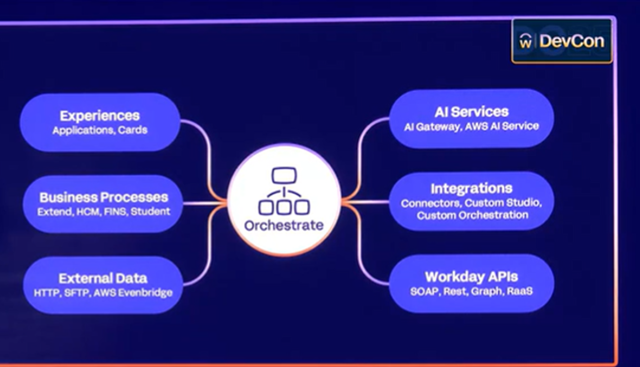
Whether you’re building Extend apps, transforming data with Prism, or automating downstream events. This tool is the powerhouse keeping integrations working efficiently throughout the entire development lifecycle.
Changes to Workday Orchestrate
Workday Orchestrate has rapidly attracted 1,300 customers since its launch, and we expect the significant enhancements announced at Workday DevCon will attract even more users. Especially since the updates to Orchestrate are accelerating development speeds, improving iteration, simplifying debugging, and enabling more intelligent automation. Workday experts in both the keynote and dedicated Workday Orchestrate sessions eagerly showcased the new capabilities.
- Copilot within Orchestrate: Adding Copilot to Orchestration Builder is a major milestone. This built-in AI assistant allows developers to create orchestration flows and documentation based on detailed prompts, which they can accept, modify, iterate on, or redo with relative ease. Users can even attach documents with context like data mapping requirements, open API specifications, and other information so Copilot can produce outputs that align with best practices. As a result, users can reduce development time by 60% in Orchestrate.
- Visual Debugging Tools: Developers can now replay their orchestrations step-by-step to identify and fix issues faster. Updates to Orchestrate now allow users to instantly replay your orchestration, iterate on the fly, and review child and parent processes in one place to identify dysfunctional processes. This significantly reduces the time spent troubleshooting and improves testing cycles.
- API Polling: With the diverse array of external systems connected to Workday, it’s not always easy for users to get the updates they need to keep orchestrations moving forward smoothly. Activating API polling in Orchestrate now enables effortless monitoring of long-running external processes and even multiple event triggers, including some that run concurrently, to automate critical business processes.
- Integration Triggers & Chaining: The ability to consolidate multiple integration types into a single cohesive flow is another critical enhancement to Workday Orchestrate. Developers can now chain together connectors, studios, or other orchestrations within a unified logic framework. This can simplify troubleshooting and reduce integration sprawl, saving time and energy hunting down integration steps.
- Extended Runtime: Workday users know that not every external system is going to quickly respond to requests. In the past, integrations in Orchestrate maxed out at a runtime of 20 minutes, hindering the concurrency of long-running requests within the broader orchestration. Now, runtimes have been expanded to 48 hours, accommodating both real-time and batch data synchronization workflows. Plus, Orchestrate now supports REST API and SOAP API for large data extractions.
Additionally, Workday is aligning development workflows with version control and DevOps best practices. One major step is creating a one-stop shop for building Workday integrations at developer.workday.com, so users no longer need to switch between their IDE and the Workday platform.
Workday Orchestrate Use Cases
Though these enhancements were just released, some early adopters have been able to road test these AI-powered features and other capabilities. From streamlining development to resolving some of the common challenges users have encountered through Workday Orchestrate, here are just a few real-world ways that companies are already leveraging these updates:
- Real-Time Job Requisition Posting: Lowe’s Companies Inc. uses Orchestrate to transform internal job requisitions into external postings. With integrated business process triggers, HR workflows are now streamlined and fully automated.
- Payroll & Tax Integration: Using orchestrations, external reference IDs can be matched and validated for payroll and tax filings, reducing manual handoffs and ensuring compliance. With the expanded runtime and the ability to customize the time between API polling requests, users can keep workflows running smoothly, even if external systems are sluggish.
- Drug Screen Processing: Scheduled batch orchestrations handle sensitive candidate data, enabling faster hiring cycles while maintaining compliance.
- Data Synchronization & Transformation: Whether it’s ingesting JSON time-off data from an external system and converting it to CSV for Workday, or running custom connectors, Orchestrate facilitates seamless, format-aware data exchange.
- Error Handling & Logging: With AI-powered suggestions, developers have been able to inject precise error-handling logic and log into their flows, giving support teams better visibility and faster resolution paths.
Perhaps most importantly, Orchestrate makes complex integrations more accessible. With its visual editor, integrated documentation, and AI guidance, both seasoned developers and business administrators can build and iterate on integrations rapidly. That way, organizations can stay agile in a constantly evolving business environment.
Next Steps
With these updates, Workday Orchestrate is more than just an integration tool; it’s a unified platform that combines the power of automation, real-time processing, and AI into one developer-friendly experience. With a dramatic increase in adoption and an expanding feature set, it’s clear that Orchestrate is changing the way enterprises think about integration.
From simplifying low-code development to enabling high-performance, scalable workflows, Orchestrate helps bridge the gap between functional business needs and technical execution. And with features like Copilot, Visual Debugging, and Integration Triggers, it’s never been easier (or faster) to build integrations that deliver real value.
Agilysis can help you unlock the full potential of Orchestrate by aligning its capabilities with your unique business processes and integration needs. From initial strategy and design to hands-on configuration and optimization, Agilysis brings the technical expertise and Workday platform knowledge needed to accelerate adoption, reduce complexity, and ensure your integrations deliver lasting value.
Want to add Workday Orchestrate to your development processes? Reach out to our Workday experts and we can guide you through the process.
Related Articles
Workday AI Innovations Making a Splash for Your Organization
From Low-Code/No-Code Development to Generative AI: Here’s How Workday Accelerates Your Innovation
Why You Should Build Your Next Custom Enterprise App in Workday Extend
Your Workday Partner
Looking for Workday services, solutions, or staff?
Get started with Agilysis today.